
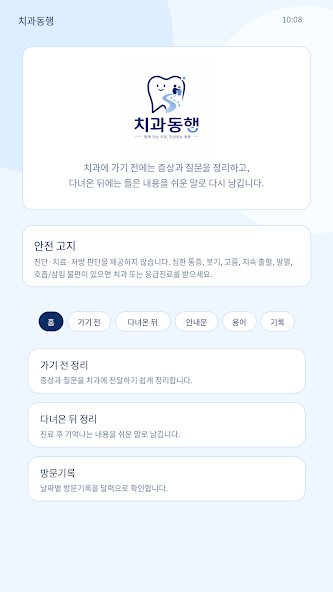
Before a dental appointment, someone may want to record where the pain is, when it started and what to ask. After the appointment, the useful note changes: it holds explanations, precautions and things to check later. Both belong to the same visit, but they are written and retrieved for different reasons.
I built 치과동행 (Chikwa Donghaeng) with separate paths for those two notes and a shared place to keep them. During May–July 2026, I implemented the screens, connected the phone features and packaged the application for Android. It is now publicly listed on Google Play.
Two ways into a visit record
The pre-visit screen turns a freely written symptom note into fields such as side, location, onset and pain level. Medication and allergies have their own places, while missing entries stay visible for the user to complete. The fields feed into a short summary that can be shown at reception or before treatment.
For the post-visit screen, I made room for the explanation the user remembers and a note they can read or listen to again. A dated visit record provides a route back to it. The app organises what a person wants to say and what they were told; it does not diagnose a condition or choose treatment.


An instruction sheet has a separate route. The user can take a picture or choose one from the photo library, then convert the pictured words into editable text. That conversion is optical character recognition, or OCR. I kept the recognised text editable and allowed a simpler version of unfamiliar wording, with a prompt to check that its meaning still matches the original. A dental glossary sits alongside these features.


Offering a choice between text and speech
I added large-text and high-contrast settings, speech input and text-to-speech, with haptic feedback—a small vibration—to acknowledge button presses. The app also distinguishes direct use from a caregiver entering information. These are implemented options. A usability evaluation with people using their own assistive technology remains unverified.
The app includes the national centre and nine regional dental-care centres for people with disabilities. Selecting a province or metropolitan area looks up a predefined regional mapping and presents a centre with phone and website links. It does not calculate the geographically nearest centre from the user's current location. A route to the official Ministry of Health and Welfare information is included because the directory can change.
Text assistance can use an external AI provider selected by the user. I also wrote simple rules that recognise terms such as “right side” or “molar” in the Korean input and populate the corresponding fields. Those rules run before the app checks whether AI is available, so note preparation can continue without an API key, the credential needed to connect to the provider. The keyword output and AI response both remain input suggestions for the user to review.
Getting the phone's back button to reach the screen
React provides the interface, and Vite prepares the files used to run and distribute it. I used Capacitor to connect that web interface to Android, adding bridges for speech, the camera and vibration. Packaging also involved permissions, launcher and splash assets, signed builds and store material.
The back button exposed a problem on a physical device. Android received the press, but the signal did not reach the web screen, leaving the exit path stuck. I traced the hand-off between the JavaScript handler and Android's back dispatcher, added a direct route from the phone side to the screen, then rebuilt, installed and checked the flow on the device.
In the resulting code, MainActivity.java sends an event named chikwa-back, and backHandler.js receives it. The existing Capacitor back event remains a second input route. If both arrive within 300 milliseconds, the handler acts only once so that one press does not become two actions.
The next action depends on the screen state: close an open overlay first, otherwise return to Home from another screen, then ask whether to exit when already at Home. I checked that back-and-exit flow on the device during development; I did not test every Android device and assistive-technology combination.
The release record and the next use task
I registered 치과동행 as a computer program with the Korean Copyright Commission on 13 May 2026, with 4 May recorded as its creation date.
The public Google Play page contains the description, developer name, six product screenshots and an update dated 30 July 2026. Its 10+ downloads band, recorded on 4 September, was still displayed when checked again on 6 September. That is the store's download band, not an exact installation total or a count of people who continue to use the app.
I have yet to establish how many people keep using the app after downloading it or whether the notes help communication during an appointment. I do not have figures for monthly active use, retention, institutional adoption or revenue, and have not measured clinical effects. Next, I want to observe someone preparing a pre-visit note and recovering a post-visit instruction on their own phone and assistive technology: where they stop, whether they can fill missing fields, and how they use text and speech.